
Plan meals. Track nutrition. Build your food system once.
Pantensa brings your products, recipes, meal plans and daily nutrition into one workflow. Start without pantry tracking, then turn Pantry mode on later — using the catalog you already built.
Not live yet · one email when it opens · $9/mo locked in for early members
The gap
Planning and tracking usually live apart.
Nutrition trackers help you record what you ate. Meal planners help you decide what to cook. Pantry apps know what is on the shelf. But these pieces rarely share one food catalog.
Pantensa starts with the part you can use every day: products, recipes, meal plans and nutrition. Pantry mode comes next, using the same foundation instead of making you start over.
Nutrition trackers
Good at recording meals.
- Often focused on one person.
- Weak connection to recipes and weekly planning.
- Your food data rarely helps with shopping.
Meal planners
Good at deciding what to cook.
- Recipes and nutrition targets may be disconnected.
- Plans often start from a blank week.
- No reliable view of what you already have.
Pantensa
A food catalog that grows with your routine.
- Products and recipes power nutrition now.
- Meal plans connect to daily tracking.
- Pantry mode adds stock and shopping later.
Build your catalog faster
Start with a scan, not a blank form.
Add products the fast way. Scan a barcode, search known food databases, or create an entry yourself when you need something custom.
Review the result before saving. Keep the imported data, adjust the serving size or nutrition values, or replace them with your own verified numbers.
- Calories
- 379 kcal
- Protein
- 13.2 g
- Fat
- 6.5 g
- Carbs
- 67.7 g
Scan first. Verify if needed.
- Scan packaged foods with your phone camera.
- Search by product name, brand, or barcode.
- Import nutrition data instead of typing every field.
- Review or edit values before saving.
- Reuse products in recipes and meal plans.
- Keep custom entries for your own routine.
Imported data is not always right. Databases disagree, packaging changes, and the serving size on the label is often not the one you use. That is why the numbers arrive as a draft you confirm — not as a fact you have to accept.
Every product you add is useful now for nutrition and recipes — and ready for Pantry mode later.
More on filling a catalog fast: nutrition tracker with barcode scanner.
You do not need to catalog your whole kitchen.
Start with the products and recipes you use most. Your catalog can grow gradually with your real routine.
Each item is useful immediately for nutrition and planning. Later, the same item becomes available to Pantry mode.
Add oats, yogurt, berries and your usual breakfast recipe today. Use them for planning and nutrition now. Later, Pantensa can use the same catalog to answer: “do I have enough to make it?”
How it works
Your daily food loop, without the double entry.
Build your catalog once, plan what you want to eat, record what happened, and close the day when it is done.
Add products
Scan a barcode, search a food database, or create a custom product. Review the nutrition data before saving.
Build recipes
Save the meals you cook, with flexible ingredients and serving sizes.
Plan the week
Place recipes on your week plan and see how they fit your calorie, macro and nutrient targets.
Log what happened
Record what you actually ate, and adjust quantities later without treating the first entry as a mistake.
Close the day
Finish the day and review it against your targets and your 7-day trend.
Grow into Pantry mode
Use the same products and recipes later for stock-aware planning and shopping.
Try the day screenOpens the prototype — no account, nothing to install
Two of these steps have a page of their own: meal planner with nutrition tracking and recipe nutrition tracker.
Day target
Your target is not one number.
A training day and a desk day are different days. The day target lets a single day carry its own figure — set before the food goes in, not excused afterwards.
Change what the day actually was, and every target moves with it. Your profile stays the default for every other day.
- A day can override the profile, and the app remembers which day it belonged to.
- Energy, macros and micronutrients recalculate together — no editing six numbers by hand.
- A figure you set yourself is flagged and survives the recalculation, with one tap back to the computed one.
Nutrition-only mode
Nutrition-only is a complete starting point.
You do not need to track your pantry to use Pantensa. Plan meals, log nutrition, compare your day with your targets and follow your 7-day trend, without adding stock management to your routine.
Pantry mode is optional. Add it later, when tracking what your household has on hand becomes useful.
- No pantry setup required.
- Products and recipes remain reusable.
- Meal planning works from day one.
- Personal targets and food diaries stay private.
- Pantry can be enabled later.
- No migration or duplicate entry.
The full case for it: tracking nutrition without a pantry setup.
Try the week plannerOpens the prototype — no account, nothing to install
Pantry mode · coming next
Your catalog becomes more useful over time.
At first, your products and recipes power nutrition and meal planning. Later, the same catalog can become a live picture of what is in your kitchen — without entering everything again.
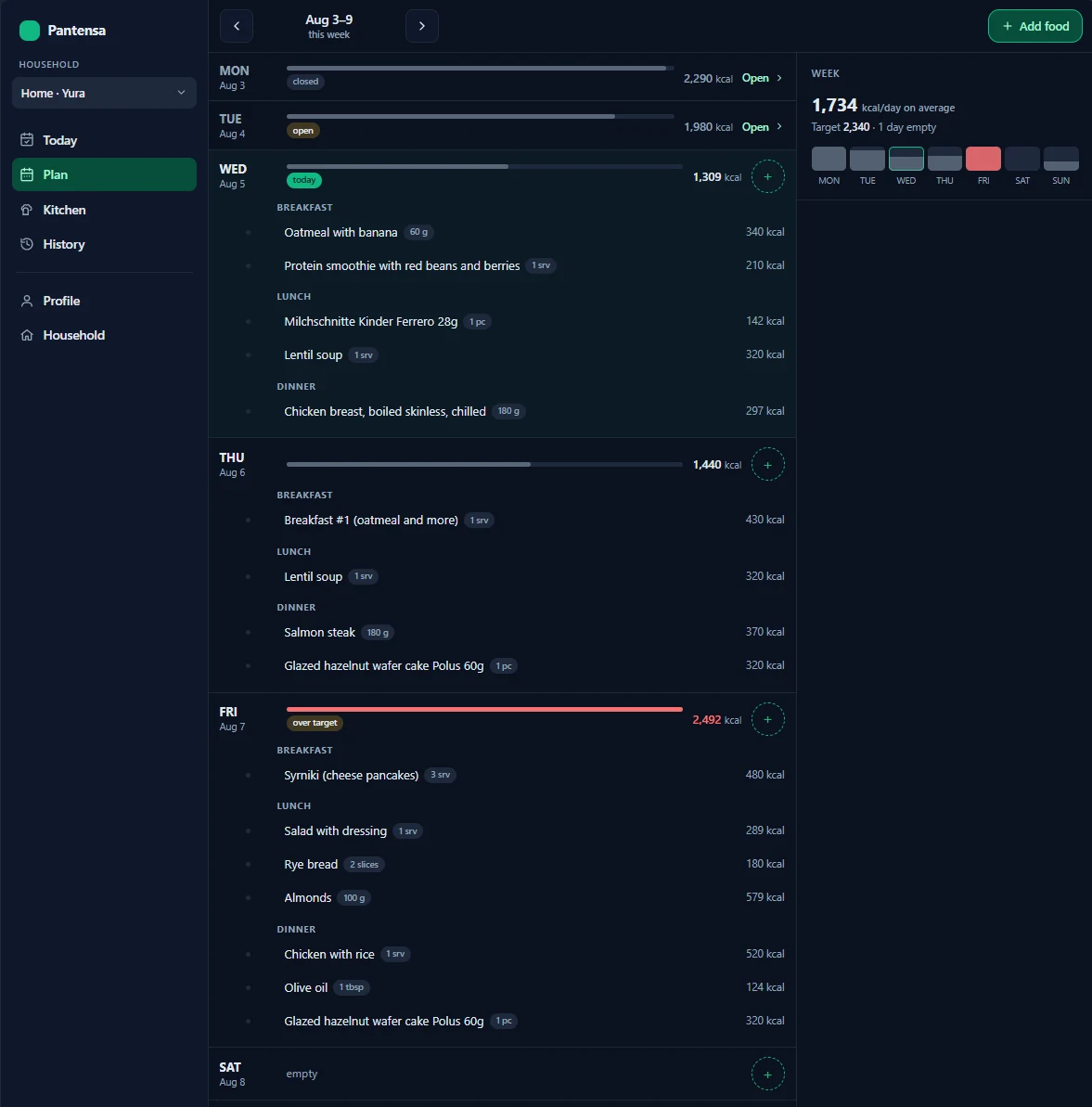
Without Pantry mode
Available in the first release
- Plan meals.
- Track nutrients.
- Close the day.
- Review your trend.
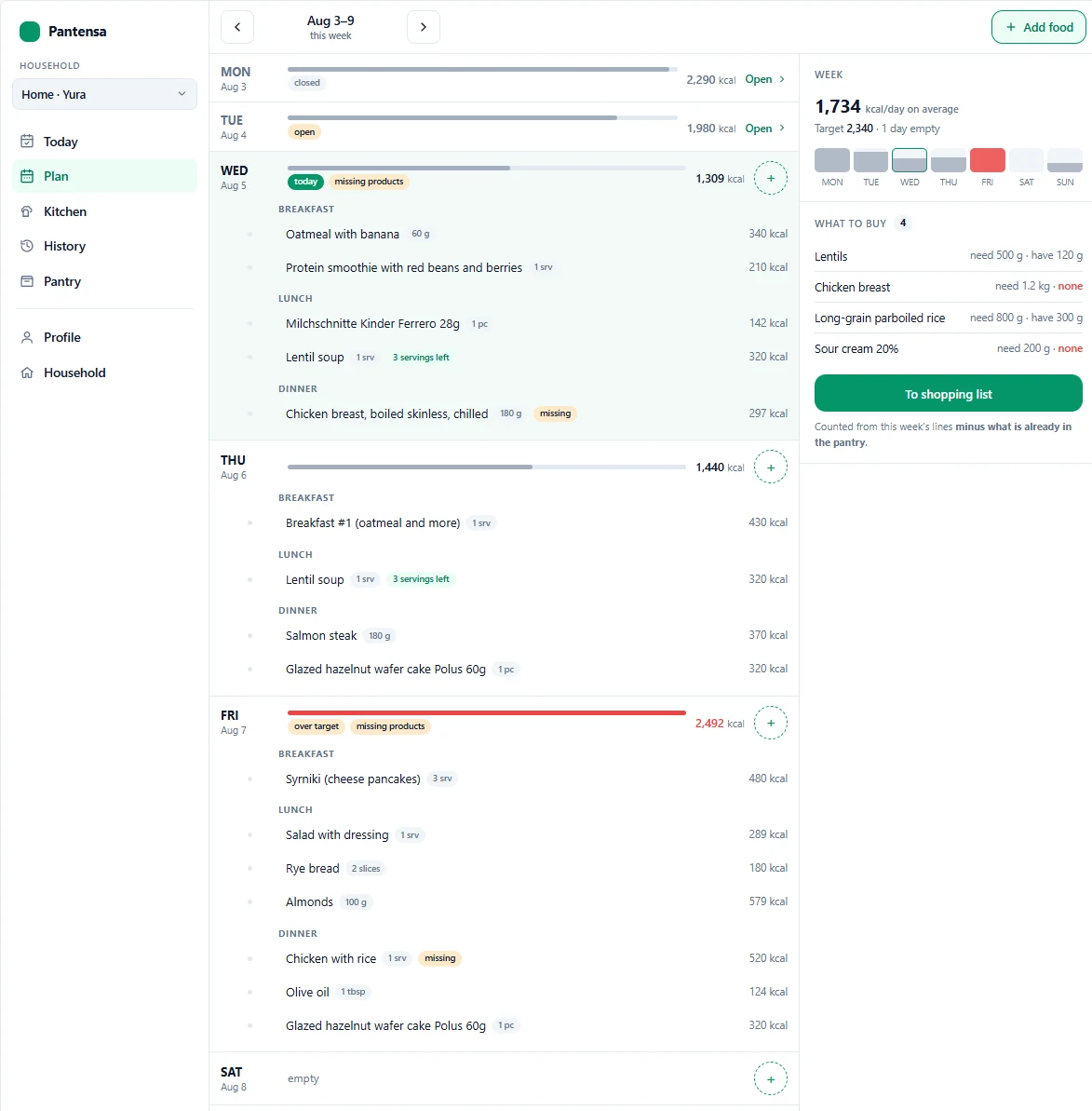
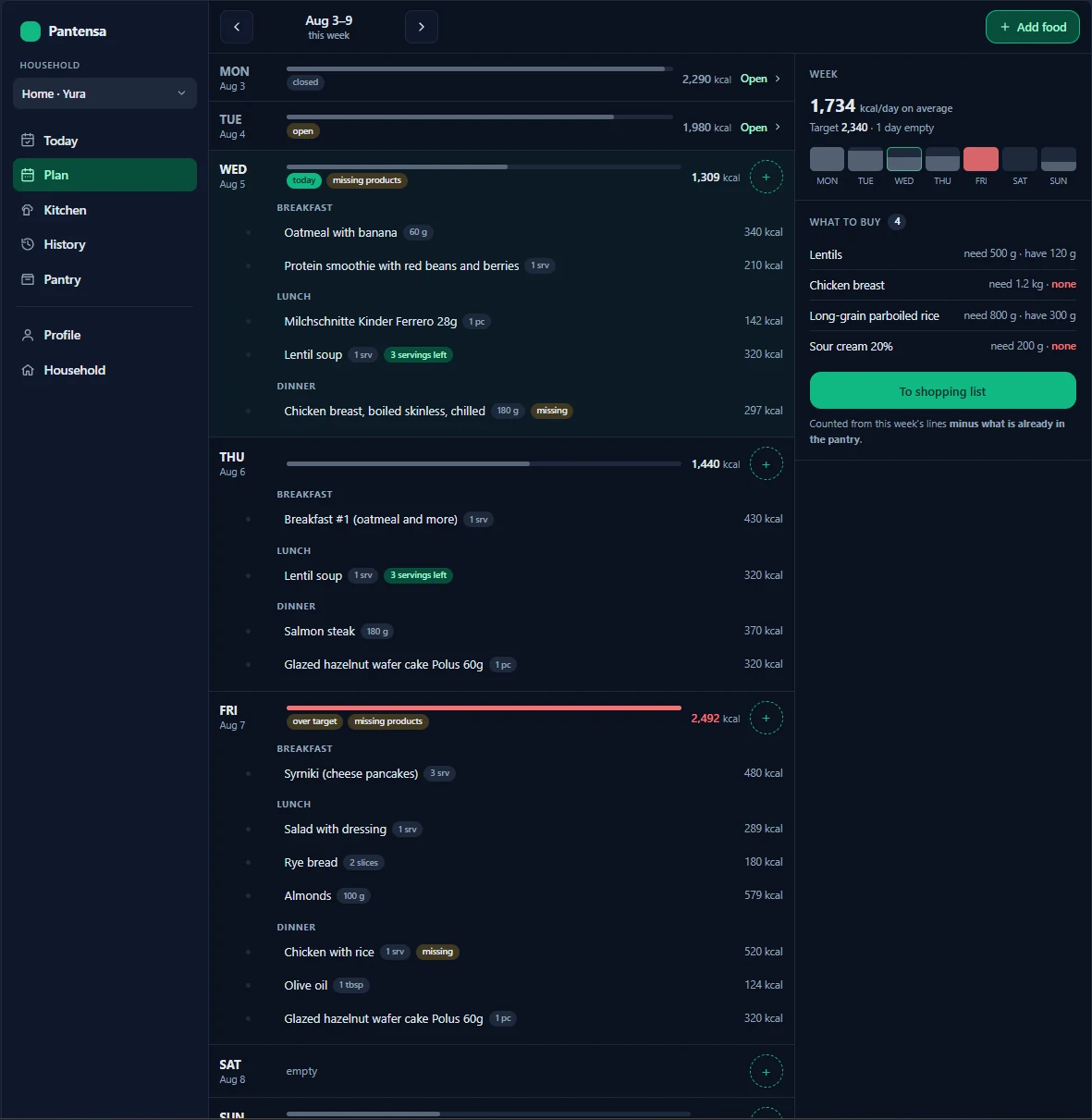
With Pantry mode
Not in the first release
- Know what is available.
- See what is missing from a plan.
- Track batches and expiration.
- Shop only for the gap.
- Track grocery prices, from each batch to a price-change chart.
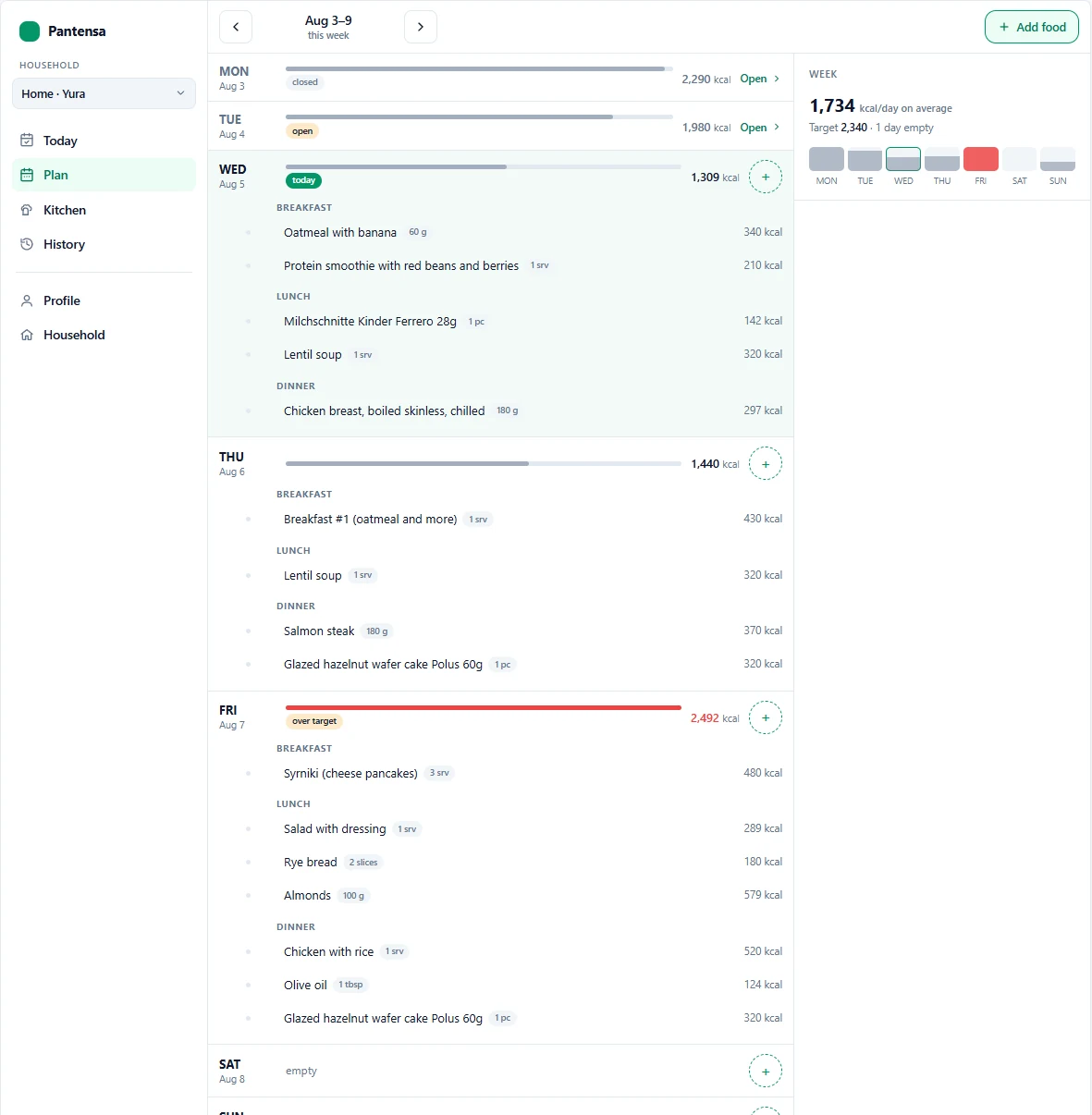
What that looks like
- Your meal plan needs
- 500 g rice
- Your pantry has
- 120 g rice
- Pantensa suggests
- buy 380 g
 Open full size
 Open full size
 Open full size
 Open full size
What this layer is meant to add, in detail: the Pantry mode preview.
Design principles
Built to forgive, not to police.
Most trackers behave like a discipline system: miss one log and the day is broken. Pantensa treats incomplete data as the normal state, not a failure to fix. Three rules follow from that.
A day is a draft, not a ledger
Log "oatmeal, ~60g" in the morning, correct it to 75 in the evening — that's an update, not a mistake. Closing a day is bookkeeping, not a verdict on it.
Unknown isn't zero
Didn't log the protein in a café coffee — the day quietly marks itself "incomplete," instead of showing a lower number that looks like a fact.
A target has a direction
Protein and carbs are goals to hit. Sugar and salt are ceilings, where 100% isn't a win. Fiber is a floor.
A focused first release
The first release focuses on the daily nutrition and planning loop. Pantry mode follows as a layer built on the same products and recipes — not as a second product you would have to set up again.
Available in the first release
- Products, with nutrition data
- Camera barcode scanning — point the camera, get the product
- Food database search — OpenFoodFacts and USDA
- Manual review and editing of imported values
- Recipes, with flexible ingredient slots — one smoothie recipe, whatever berry you have
- Meal planning
- Nutrition tracking: calories, macros and the wider nutrient set
- Close day
- Personal targets
- History and 7-day trends
- Nutrition-only mode
- Household: invite by link, shared recipes, private diaries
- Installable app for your phone (PWA)
Pantry mode — coming next
- Stock quantities and batches
- Expiration tracking
- Missing-product warnings
- A shopping list from planned meals minus stock
- Cooked-dish inventory
- Pantry-aware meal planning
- Grocery price tracking, from each batch to a price-change chart
- Household grocery flows
Later
- A feed of "who ate what" — the data exists, which is exactly why it needs its own decision
- Auto-planning weeks ahead — cooking ships; planning a week automatically doesn't
- A dashboard — it gets added when it earns a real job, not as a shortcut
- An advanced AI assistant, webhooks, 2FA, a "Health Score" — later, on purpose
Pricing
One household plan that grows with your food system.
Start with nutrition, recipes and meal planning. As Pantry mode arrives, the same household plan can grow into stock-aware planning and shopping.
$12per month, per household
- One household, not one seat per person.
- Shared products and recipes.
- Private nutrition diaries.
- Nutrition-first at launch.
- Pantry-ready catalog.
- Early-member price locked in.
Join the waitlist before launch and you pay $9 instead — locked in for as long as you stay subscribed, even after $12 becomes the standard price.
What "one household" actually means: shared recipes and private food diaries.
Trust & privacy
Health data is sensitive. This was designed in, not bolted on.
What's shared, what isn't, where it lives, how you get it out, and who else can touch it.
Your food diary is private
Even in a shared household, nobody sees what someone else ate — not even a spouse. Recipes and the meal plan are shared; the diary and your targets are yours.
App data is processed in the EU
EU region hosting, with a named data controller and a real contact in the privacy policy — not an anonymous company.
Export and deletion, any time
Full export and account deletion, whenever you ask. Nothing expires and nothing auto-deletes — your history stays until you remove it.
As few subprocessors as possible
Hosting and email. Any future AI provider is a separate consent question, not a silent config change.
FAQ
Common questions
What is Pantensa?
Pantensa is a nutrition-first meal planning app that grows into pantry-aware planning. The first release helps you manage products and recipes, plan meals, track nutrients, and close each day. Pantry mode will later use the same catalog to track stock and shopping gaps.
Is Pantensa a calorie and macro tracker?
Yes. Calories, protein, fat, carbs and the wider nutrient set, checked against a personal daily target with a 7-day trend.
Can I add products by barcode?
Yes. Scan a packaged food's barcode and Pantensa can look up the product details. Review or edit the imported data before saving it to your catalog.
Do I have to track my pantry from day one?
No. Nutrition-only is a complete mode, not a limited trial. You can use products, recipes, meal planning, daily logging and close day without tracking stock.
How is Pantensa different from MyFitnessPal or Cronometer?
They're strong nutrition trackers, but they are built around one person logging food. Pantensa is built around a household catalog: the products and recipes you enter are shared, they carry your meal plan and your daily tracking, and one plan covers everyone under one roof instead of one seat per person. The same catalog is what Pantry mode will use later.
How much does Pantensa cost?
Pantensa is planned at $12 per month per household. Waitlist members receive the early price of $9 per month, locked in for as long as they remain subscribed.
Is Pantensa available yet?
Not yet. Join the waitlist and receive one email when Pantensa opens.
More questionsFewer questions
Does Pantensa work on iPhone and Android?
Yes — Pantensa is an installable web app (PWA). It runs in any modern browser and installs to your home screen on iPhone and Android like a normal app, no app store needed.
Can other people in my household see my food diary?
No. Household recipes and planning can be shared, while each person's food diary and personal targets remain private — not even a spouse sees what you logged.
Where does nutrition data come from?
Pantensa can search known food databases, including Open Food Facts and USDA FoodData Central. Imported values are shown for review, and you can adjust them when the package or serving size differs.
What if the product is not found?
Search by name or brand, create a custom product manually, or add the details from the package. Your custom entry can be reused in recipes and meal plans.
Do I need my own server, like with Grocy?
No. Grocy and Mealie are self-hosted — you run and maintain your own server. Pantensa is a hosted app: open it in the browser, install it on your phone, done. Nothing to set up, patch, or back up yourself.
Do I need to catalog my whole kitchen?
No. Start with the products and recipes you use most. Your catalog can grow gradually with your real routine.
Why should I add products before Pantry mode?
Products are useful immediately for nutrition and meal planning. Later, the same catalog will power Pantry mode, so you will not need to rebuild it.
What will Pantry mode add?
Pantry mode will track stock and batches, handle expiration dates, show what is missing from a planned meal, and help build shopping lists from the difference between what you need and what you have.
Will I need to migrate my data?
No. Pantry mode is designed to use the same products, recipes and meal plans created in the nutrition-first version.
Start with the system you need today. Grow into the one you want tomorrow.
Join the waitlist for Pantensa's nutrition-first release. Build your products and recipes once, plan your meals, track your day — and be there when Pantry mode arrives on the same catalog.
Join the waitlist